
01 / ASSISTANT
“Iris, what am I looking at?”
Read a sign. Ask about a plant. Look something up. Iris can use the camera on your glasses or your iPhone, and answer out loud.
For Ray-Ban Meta. Also on iPhone.
More from the glasses you already wear. Ask about what you see, get an answer in your ear, or open Translate to understand someone speaking.
iPhone · iOS 17.2+ · Glasses optional
Internet connection required
Still a beta. Built with your feedback.
Try it in your day-to-day life. Tell us where it helps—and where it doesn’t.
Start with what you need
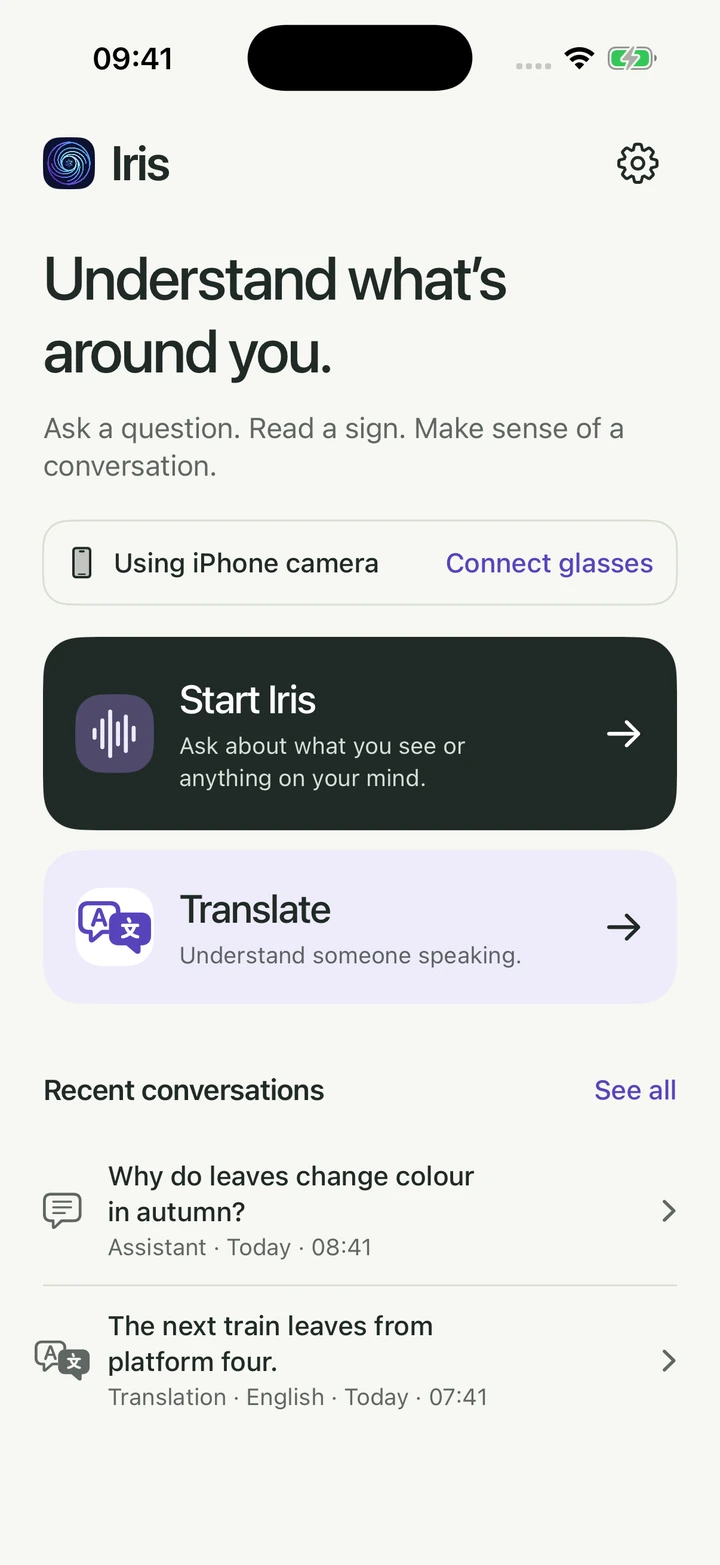
No need to start the assistant just to translate. Both tasks have their own place on Home.
Read a sign. Ask about a plant. Look something up. Iris can use the camera on your glasses or your iPhone, and answer out loud.
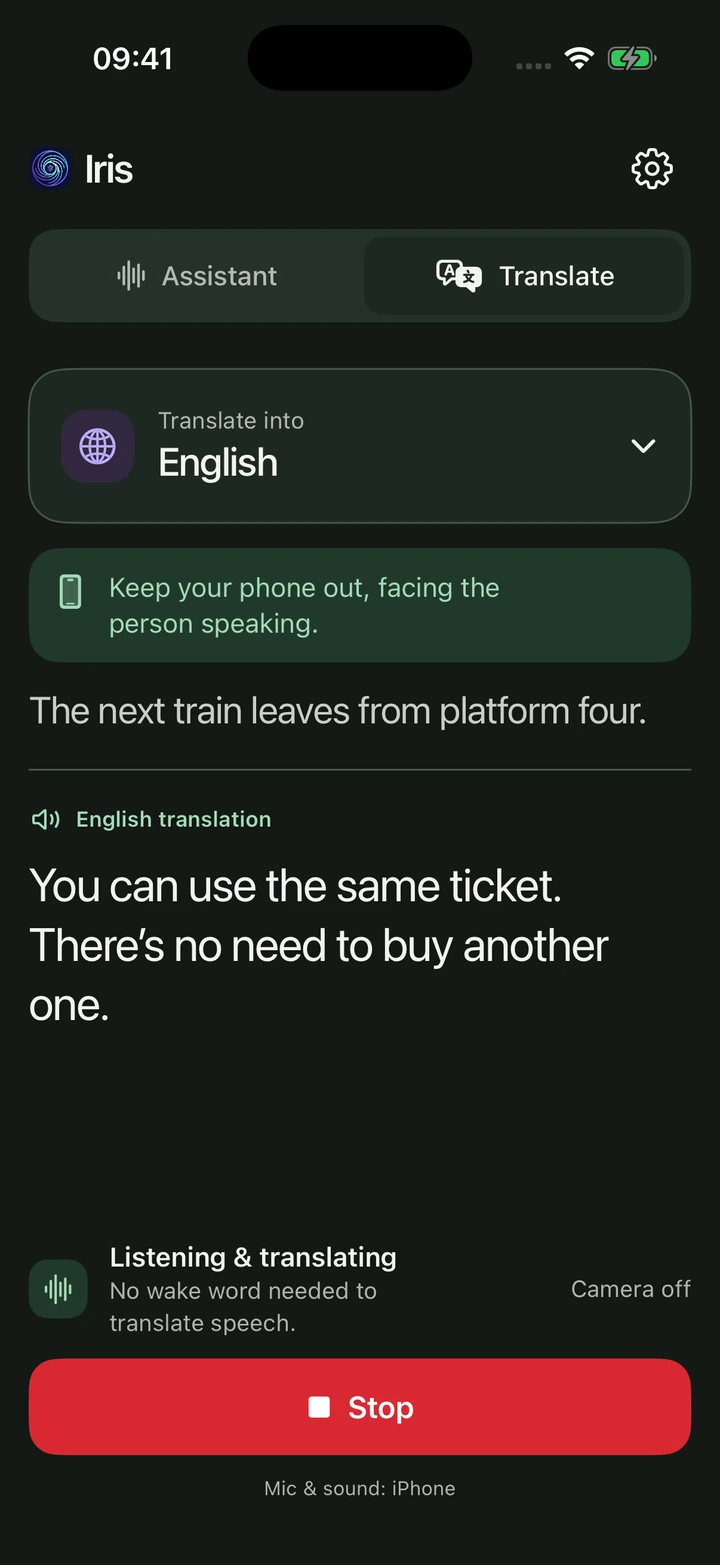
Open Translate directly from Home. Choose one of 13 output languages and keep your phone out, facing the person speaking. No camera or wake word needed.
A look inside
Readable turns, a clear way to switch tasks, and a Stop button that stays within reach. The app follows your phone’s light or dark appearance.
Choose your camera. Start Iris or Translate. Reopen a recent conversation.
Clear speaker labels and camera controls. Keep talking with the live camera off.
Change the output language on screen. Hear the translation and read along.
Browse saved conversations and translations. Read, share or delete them.
These are simulator-rendered UI previews made from the current SwiftUI components, with sample conversations—not live AI sessions. The Assistant example has its camera off.
Showing light appearance.
Useful beyond the first question
Use the glasses camera or your iPhone. Ask Iris to read a sign, describe what’s in front of you, or take a closer look.
Ask about a moment from roughly the last five minutes of camera use. Photos captured in Iris join that recent window—not a permanent photo library.
Some brief moments can fall between samples. Searching for something without a time hint needs hosted sign-in.
Ask Iris to look something up on the web and speak the result. Hosted access provides web actions; technical users can connect their own OpenClaw agent.
An action backend must be configured. It isn’t phone or app control.
Ask for your location, the phone’s compass direction or today’s steps. Open a destination in Maps when you want a route.
Choose Iris’s voice and response language. With hosted memory enabled, Iris can keep durable preferences for future sessions.
Say “Iris, report this bug” to send feedback to the team. Or use Settings → Send Feedback for text, screenshots and a recorded voice note.
Spoken notes go to the Iris team; they aren’t a personal notes collection.
Live translation
Choose the language you want to hear—not the language you need to recognise.
Get started
Have Ray-Ban Meta glasses? Connect them for an eyes-up assistant. Translate uses your phone microphone either way.
Open our invite on your iPhone. Install Apple’s TestFlight app if needed, then return to the invite and tap Accept → Install.
Open the beta inviteAsked for an invite code? You don’t need one. Open the invite link again after installing TestFlight.
Hosted: enter your email in the app and follow the sign-in link. Assistant, Translate, web actions and optional memory use your hosted account.
Your own keys: add a Gemini key for Assistant, an OpenAI key for Translate, or both. Translate works without a Gemini key.
Home shows which camera Start Iris will use. Without glasses, it uses your iPhone. Tap Connect glasses to complete Meta’s handoff; when both are available, tap Change to choose.
Pair the glasses in Meta AI. For the public beta’s glasses setup:
Assistant: tap Start Iris, then say “Iris” and ask. After a long pause, say the name again.
Translate: tap Translate on Home, choose the output language, and keep your phone out facing the speaker. No assistant session or camera needed.
Hosted beta access includes a small monthly usage allowance; the existing offer covers the first 100 hosted accounts. If the seats are full, the app offers a waitlist. Your own keys use your providers’ pricing and limits.
Give your next question somewhere to go
Try the beta on your iPhone.
Add your glasses when you’re ready.